Author: Lorelle VanFossen

Lorelle VanFossen is a pioneering XR Innovator and WordPress leader, tech educator, keynote speaker, and producer bridging virtual reality and digital innovation. Co-founder of Educators in VR, founding WordPress community member, and passionate advocate for emerging technologies and human rights. Expert in immersive education, VR/XR event production, UX, and digital transformation.

NaNoWriMo: How to Write a Novel in 67 Steps

Part serious, part humor, “In Reality How People Write A Novel: 67 steps” by the The Authors’ Nook breaks down the novel process into quick and easy steps such as:

  1. Declare to your friends and family that you’re writing a book.
  2. Immediately regret telling them because now you feel pressure.
  3. Stare at a blank page.
  4. To freshen up, Google: “How to write a book.”
  5. Remember that it’s a massive undertaking.
  6. Friends ask you, “So, how’s your book coming? Remember me when you’re famous!” And you want to die.
  7. Start to plot the novel just to get your mind off the pressure.
  8. Writer’s block.
  9. Netflix binge.
  10. Write 15 pages.
  11. Rewrite the 15 pages.
  12. Delete 14 pages.
  13. Drink a little too much.
  14. Netflix binge.
  15. Structure your story.

Sound familiar?

NaNoWriMo: Beat Sheets and Story Engineering Worksheets

There are some terms you need to know if you will be participating in NaNoWriMo this year.

  • Plotter: A writer who plots out their story with an outline, which they tend to follow for the most part during NaNoWriMo.
  • Pantser: A writer tackling NaNoWriMo with little planning and forethought, just writing by the seat of their pants.

A few years ago, a new term arose, brought to light by Angela Quarles, self-labeled a Geek Girl Romance Writer. She also offers writing advice, tutorials, and tools to help writers.

In her post about her experience and the lessons learned, she describes the two key types of writers who participate in the National Novel Writing Month challenge, and invented her own type called plotser:

What’s a plotser? A cross between a pantser and a plotter, with maybe a wee bit more emphasis on the pre-plotting.

With Hurricane Sandy and other circumstances, my new agent (signed only on Oct 4) and I weren’t able to coordinate on what direction to take for a sequel to MUST LOVE BREECHES. So for most of October, I wasn’t even sure if I was participating in NaNoWriMo. Then at the end of the month, I decided to take up a premise that had nothing to do with BREECHES so I wouldn’t waste my time writing a sequel she didn’t want.

However, that meant I’d not spent time plotting at all.

I had what I thought was a fun premise and a sense of who the H/h were and so started one day late on November 2. I caught up with everyone over the weekend and was doing swimmingly until about Day 5, then my word count dribbled downward and things ground to a halt. I had no idea where I was going with this and I didn’t like feeling that way. This wasn’t the normal ‘what I’m writing is drivel’ feeling, I really felt like all my characters were just spinning their wheels waiting for something to happen. Like the plot. Ugh.

A local writer friend sagely advised me to take a break for a week, two weeks, to figure out the plot and then do a FastDraft blitz at the end. So I did! I ended up creating a spreadsheet to help myself stay focused on what I needed to discover…

As a result of her experience, she created the Story Engineering Worksheet (Excel Spreadsheet), a spreadsheet created in Excel that breaks down all the elements of a novel into their finest detail. To download, click, on the link or right click and save to your hard drive.

Described as a “mix of the four act/part structure, and beat sheets,” the worksheet is based on the spreadsheet by Jamie Gold called a beat sheet, a worksheet that structures your plot all on one page.

Described by Storyfix in their Lessons for Writers:

The “beat sheet” is a way to sequence your story, using bullets instead of whole sentences or paragraphs.

Yes, this is an outline, but it is more than that. It is a scene structure for your novel built around basic plot points or story arcs. (more…)
Jessica Morrell Speaks on Anchor Scenes November 9

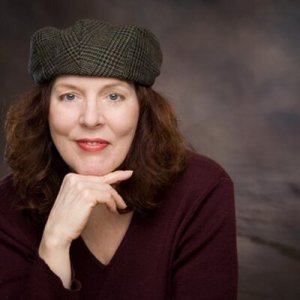
Jessica MorrellSave the date and be at the Forest Grove Senior and Community Center on Monday, November 9, 2015, from 9-11am for a great presentation by a favorite author and writing instructor, Jessica Morrell. We expect the room to be full so bring a clipboard or something to write on as there may not be enough seats at tables.

Jessica will be presenting her workshop on “Anchor Scenes.” This is a talk presented typically in a day workshop, distilled for us into two hours. The presentation description is:

The task of a novelist or memoirist is to tell a story so riveting that it will hold a reader’s attention for hundreds of pages. This requires intimate knowledge of characters, their inner lives, and central dilemma. It also requires an understanding of plot, the sequence of events that take readers from beginning to end.

These events won’t hang together without a compelling structure that underlies the whole—the essential scenes that every story needs to create drive, tension, conflict, climax, and resolution. We’ll pay special attention to the architecture of scenes and the plot points and reversals that power stories forward.

Jessica offers a wide variety of writing workshops and conferences around Oregon and the Pacific Northwest. There are day workshops to full weekend conferences, helping the writer dig deeper into their craft.

Her book, Thanks But This Isn’t For Us, is wildly acclaimed as being the first book a writer should read when preparing to enter the publishing industry. Between the Lines is another fiction writing technique book that takes the writer through the process of exploring the deeper story between the lines in your writing, and structuring your story line, character development, and plot in and around these guidelines and rules.

Writing Out the Storm is a book that deals with what many writers face, the fear that goes beyond writer’s block.

So you sit down to write and find that you’re scared. Of starting, of trying, of putting your bruised heart on the line and words on a page. But I believe that we can quell this fear, put it beside us like a sleeping dog, and write despite our fears, our doubts, our cowardliness.

You must be wondering, if writing is such a pain, why bother? The answer is easy: because writing is good for us. It deepens us, strengthens us, teaches us how to be honest and patient and loving. Writing is both a practical skill and a way of connecting to ourselves and a bigger source. Becoming a writer will unleash our creativity, and in turn, creativity brings meaning to our lives. It all adds up to something wonderful…

The following are some of her recent articles about the craft of writing and publishing to give you a taste of the magic of Jessica Morrell.

We are privileged to have her present for Writers in the Grove. The event is free, though we will starting a fundraising drive for the Community Center and pass a hat around asking for contributions.

Frozen Fire – Chihuly Glass Speaks

The following was written by Writers in the Grove member, Bev Walker. It is dedicated to Dale Chihuly, the internationally acclaimed hand-blown glass artist from Seattle.

I wasn’t always this beautiful.
I wasn’t always such glorious colors.
I started my life’s journey, and speak to you now,
as a quite drab mere speck of sand.

Prompt: Turn a Fairy Tale on Its Head

The prompt this week came from Writers in the Grove member, Bill Stafford, a poet and long-time resident of Forest Grove.

Take something you know well like a fairy tale, children’s tale, saying, or anything that most people are familiar with and turn it on its head. Twist it around and see what happens if you change things up.

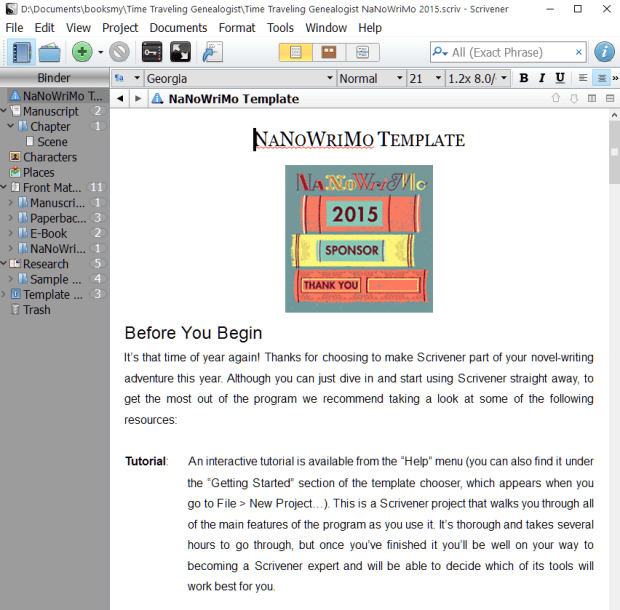
NaNoWriMo Novel Template for Scrivener

We’ve several members prepping for NaNoWriMo this year, the annual National Novel Writing Month where writers commit to write 50,000 words in 30 days through the month of November. We’ve put together “It’s NaNoWriMo Time: How To, Tips, Techniques, and Survival Advice” to help you as well.

For those using Scrivener to write and track their daily targets of 1,667 words, Scrivener is not only offered for 20% off during NaNoWriMo, but they also have a NaNoWriMo Novel Template to help you keep track of your progress.

Download and install the free (or paid) version of Scrivener. You will find all the information including tutorials and the template file on their Scrivener NaNoWriMo 2015 Offers web page.

NaNoWriMo Novel Template Setup.To install the NaNoWriMo Novel Template:

  1. Scroll to the bottom of the 2015 offers web page and look for the title The NaNoWriMo Novel Template
  2. Click or right click and save the ZIP file for the version of Scrivener you are using (Mac or Windows)
  3. Extract the scrivtemplate file to the directory where Scrivener is installed and the subdirectory called ProjectTemplates.
    • The location on your computer is typically C:\Users\UserName\AppData\Local\Scrivener\ProjectTemplates
  4. Open Scrivener and go to File > New Project
  5. Switch to the Fiction Templates
  6. Look for a template titled NaNoWriMo Novel Template and select it
  7. Type in a file name such as “My November 2015 Novel Draft” and choose the folder in which to store the files within your Documents folder
  8. Click Create
  9. The first document you will see contains all the instructions you need to understand how to use the template during NaNoWriMo.

NaNoWriMo Novel Template Instructions.

To get started on November 1, go to Project > Project Targets and drag that pop-up window to a location where it doesn’t interfere with your writing. Start writing, and glance over after 45 minutes or so to see how you are doing. (more…)

A Prompt a Day for NaNoWriMo

To honor NaNoWriMo and members and fans of Writers in the Grove, our members are submitting a prompt-a-day for the entire month of November.

The prompts cover everything and anything. They might include an image for a wordless prompt or a quote or suggestion.

You may do what you wish with these prompts. You may twist them around to meet the needs of your story, characters, or plot. You may use them as a tangent writing project to help you break out of a blocked thought or walled-off idea. The word count still goes into your official ledger.

If you would like to join us for NaNoWriMo, we’ve put together “It’s NaNoWriMo Time: How To, Tips, Techniques, and Survival Advice” to help you ensure a successful month of writing in November.

You will find all the prompts in our Prompts post category. Follow/Subscribe to the site to keep up with these throughout the month of November during NaNoWriMo. You may unsubscribe at your leisure afterward, or keep being inspired by the great weekly prompts and activities from Writers in the Grove.

If you live in the Forest Grove, Washington County, Oregon, area, we invite you to join us. We meet weekly on Monday from 9-11am at the Forest Grove Senior and Community Center, and monthly at the Forest Grove Library, typically the second Saturday of the month at 10AM.

NaNoWriMo Prompts for November

The following will be a list of the NaNoWriMo Prompts on this site for the month of November 2015, starting the morning of November 1.

Come join the fun and write, write, and write some more!

Scrivener Update Released

Literature and Latte, makers of Scrivener, have just released a new update. When you launch Scrivener, it will offer to update. Please do. If you have Scrivener open, either close and reopen it or go to Help > Check for Updates and install the latest update.

There are a few things you need to know about this update.

  • Not Backwards Compatible: If you create a project in Scrivener 1.9 (new version), it will not be readable in an older version of Scrivener. They have made signifant changes, so if you have Scrivener installed on multiple computers such as your desktop and laptop, update all of them.
  • Scrivener moving toward mobile version: The changes in the new update to Scrivener is a move to ready it for a mobile version.
  • Project File Names: In the past, project.scriv was the generic project file name. It will now use the project folder name rather than “project” to help you keep track of the project files better.
  • Inspector: The Inspector has been changed a bit to allow easier usage. A View > Inspect submenu has been added for different Inspector tabs, and multiple Inspector comments and footnotes maybe expanded and collapsed using the View > Outline commands.
  • Compile: Compile now recognizes tabs and carriage returns.
  • Tutorial Updated: Updates to the tutorial build into Scrivener now includes recent modifications and a new “Quick Start” collection.

Other improves include adjusting for Windows 10 and a wide variety of bug fixes to help Scrivener work better and run smoother.

As usual, when a maintenance or major version of Scrivener is released, it is free to registered users and it is essential to update immediately. Some of these updates may include security fixes. Also, Scrivener just keeps getting better and you don’t want to get left behind.

They’ve also updated some of their Scrivener Video Tutorials to help you stay updated or learn new techniques in Scrivener.

We will be adding more Scrivener tutorials to the site soon, and plans are in work for another Scrivener workshop coming to Forest Grove, Oregon, soon.

Don’t have Scrivener yet? Scrivener will be on discount in anticipation of NaNoWriMo (National Novel Writing Month). Regularly USD $40, NaNoWriMo participants may buy Scrivener for 20% off. If you complete and win NaNoWriMo (write 50,000 words in 30 days), they will send you a coupon for 50% off Scrivener.

NOTE: Scrivener requires Microsoft C++ Runtime to be installed on your computer. If you are having problems with the installation, ensure that it proberly installed and reboot your machine before running Scrivener or the installation/update again.

Write to Publish Conference in Portland, Oregon

Write to Publish by Ooligan Press and Portland State University is January 30, 2016, in Portland, Oregon. The all day conference is a fundraiser and features non-credit workshops, speakers, panels, vendors, and presentations by author and professionals in the writing and publishing industry.

The focus of the conference is about writing to publish, and navigating the publishing industry as a writer.

Tickets are available now for $80, with discounts for college and high school students.

Prompt: A Terrible Tragedy

The prompt this week was suggested by the recent shooting at Umpqua Community College as well as other tragic events.

Write about a tragedy, one that involves risk and fear. Put your character(s) under pressure in the middle of something where split second decisions could make things worse or resolve the issue.

Our hearts and thoughts are with the families and community of Roseburg, Oregon. Forest Grove hosts Pacific University, and we are kindred spirits sharing your pain and loss.